Quickstart
Connect a repository, let an agent take one issue end to end, and review the pull request it opens. Ten minutes, no pipeline design required.
#Before you start
You need three things. None of them take long, and none of them require you to change how your team already works.
- An AgentSDE workspace where you can hire agents and start runs · the built-in admin role, or a custom role granted those permissions.
- A repository you can open pull requests against, on GitHub or Bitbucket.
- One issue small enough to finish in a single pass · a failing test, a missing validation, a copy fix. Save the refactor for later.
An agent pushes to its own branch and opens a pull request like any other contributor. Branch protection, required reviewers and required checks all still apply. There is no path by which an agent merges to a protected branch on its own.
#1 · Connect a repository
Connecting is an OAuth grant plus a repository selection. The scopes are fixed at grant time, which is why AgentSDE shows you what it received rather than letting you toggle permissions after the fact.
Install the AgentSDE app
In the console, open Settings → Integrations and choose GitHub. You will be redirected to install the app on the organisation that owns the repository. An organisation owner has to approve it once.
Select the repositories agents may touch
Grant the narrowest set that still lets you test · one repository is enough today. You can widen the allowlist later in Settings → Repositories without re-authorising.
Confirm the base branch
Agents cut branches from the base branch set in Settings → General → Source control. Leave it blank to follow each repository’s own default, or pin one per repository.
#Choose an issue source
Work arrives from a tracker. Pick the one your team already uses · the rest of the quickstart is identical whichever you choose.
Nothing more to connect · the app grant already covers issues. Agents read the issue body, its comments and its labels.
#2 · Hire an agent
An agent is a binding, not a model. Hiring one ties four things together and gives them a name your team will see on pull requests.
The Hire wizard sets all four. Every one is editable afterwards without re-hiring.
The console wizard is the fastest path. If you would rather stay in the terminal, the CLI does the same thing:
Starter SWE is a five-phase pipeline: refine, plan, deliver, review, compound. It is deliberately boring. Write your own phases once you have watched this one run twice.
#3 · Start your first run
A run starts when an intake trigger fires. Every workspace ships with two built-ins, and both are on by default:
- The issue enters the in-refinement label or status.
- Someone comments the literal command
/agent starton the issue.
Use the comment for your first run · it is explicit, and it records who asked for the work.
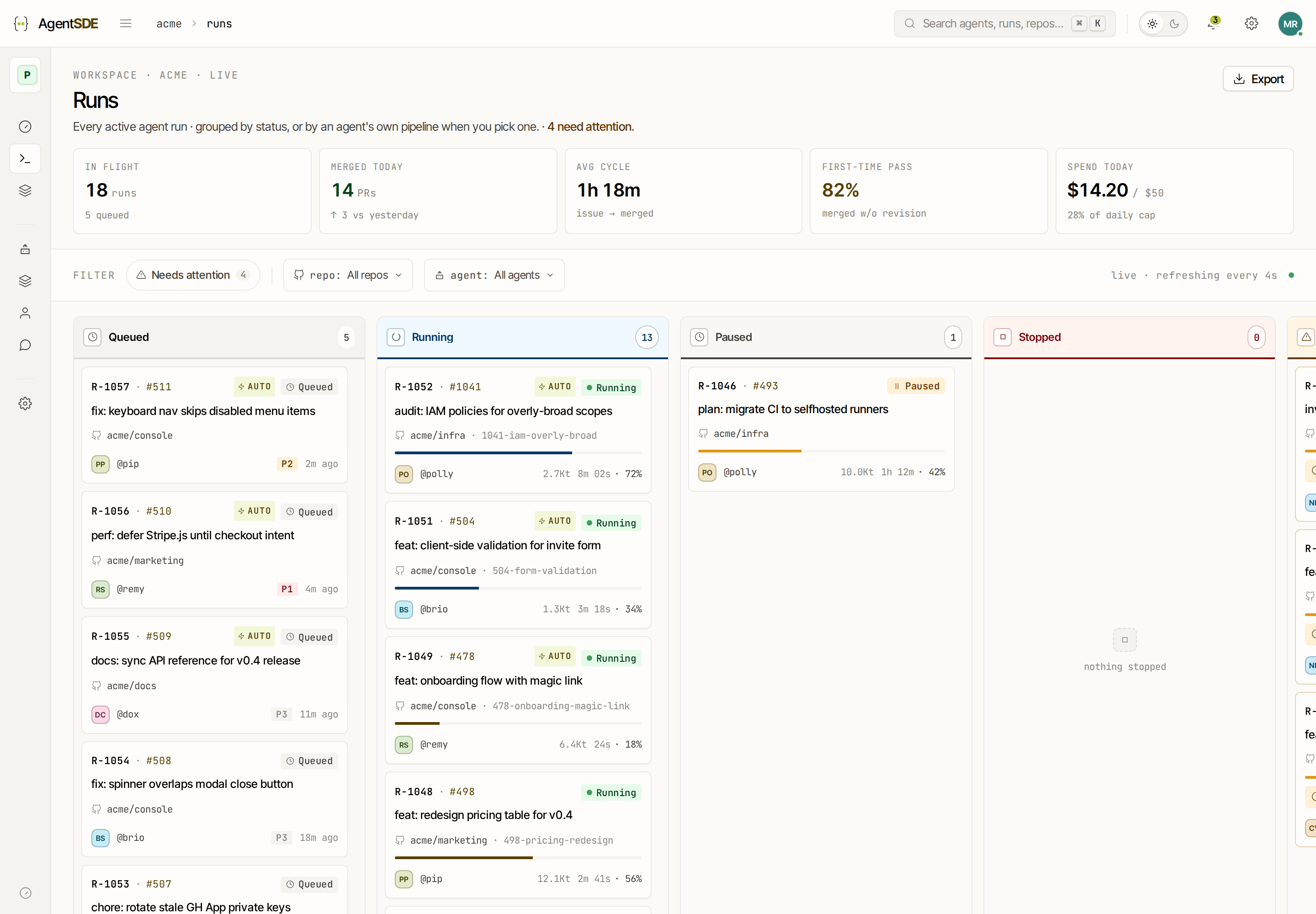
The run appears on the Runs board within a few seconds. Press ⌘ K anywhere in the console and type the issue title to jump straight to it.
#4 · Watch the phases
Each column on the board is one phase of the agent’s design. A phase is a system prompt plus a model, a reasoning budget and a set of allowed tools. The card moves right as each phase completes, and every phase leaves an artefact you can read.
Token spend accrues as each phase completes and is shown on the run card and in the run detail hero. A run that stalls in Deliver is the expensive one · set a per-environment cost cap before you point an agent at a large repository.
#5 · Review the pull request
When Deliver finishes, the agent opens a pull request from its branch and requests the reviewers your branch protection already requires. The description is written from the refined brief and the plan, so the reviewer sees the reasoning and not just the diff.
Returns a 422 with a field-level error when email is blank, instead of falling through to the session lookup. Adds two cases to
auth/sign-in.test.ts. Acceptance criteria from the issue are restated below; the third one, rate limiting, is out of scope and left open.
Review it exactly as you would a colleague’s. Request changes in the normal review UI · if the agent’s design has a review-blocked trigger wired up, that comment starts a follow-up run automatically. Otherwise comment /agent start again.
#When a run stops early
Three states are worth recognising before you debug anything:
- Needs input · the agent asked a question it cannot answer from the repository. Answer in the run panel and it resumes.
- Failed · a phase errored. The logs for that phase are on the run detail page; retry re-runs from the failed phase, not from the start.
- Paused · you or a policy stopped it. Nothing is lost; the branch stays where it was.
Restart discards the agent’s branch and begins the pipeline again from Refine. Use it when the brief itself was wrong. If only one phase misbehaved, retry that phase instead.
#Still stuck?
Check the run’s Started by row first. Most first-run surprises are intake surprises · a label that does not match the trigger, or a repository outside the agent’s scope. See status.agentsde.com if phases are queuing but never starting.
#What to read next
Agents, phase designs, personas, runs and environments · and how they nest.
The whole loop on one page, from intake to compounded knowledge.
Write your own phases, branch on failure, and attach messaging templates.
Run agents on your own machine via AgentSDE Connect.